An agentic studio web app for AI-powered product advertising — from upload to campaign-ready visuals, with iteration built in.
Architected and engineered by Ali Esfandyari
2026
Proprietary (not public)
Overview
HeroFrame AI is a dark, Flair-inspired studio experience for teams and solo creators who need on-brand product ads without a full production crew. Users upload a product photo; Gemini analyzes the image and proposes creative directions. A short brief can be expanded into a rich prompt; image-to-image generation runs through Replicate (Flux-class models) or Google depending on configuration. Scene tools feed real parameters into the prompt pipeline, chat refines the next render, and version history keeps iterations traceable — on desktop and mobile, with a marketing landing and a full-screen lightbox for export and sharing.
Input
Product photo, brand voice, and optional scene controls — not a generic template factory.
Intelligence
Gemini for vision, expansion, refine chat, scene inference, and per-network social captions.
Output
Campaign visuals, exportable assets, and a repeatable iteration loop for real campaigns.
Product
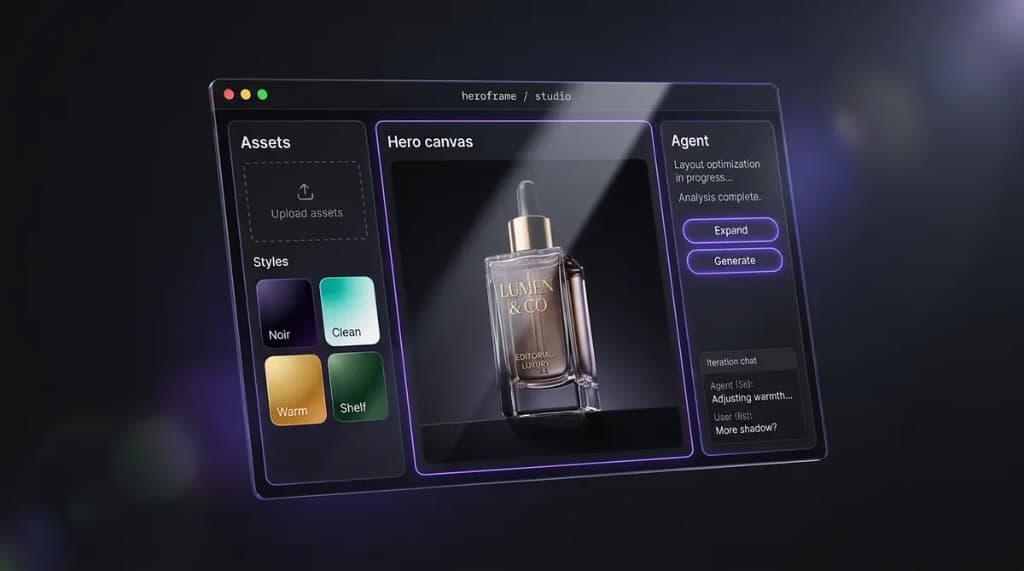
Aesthetic: dark mode, violet and indigo accents, frosted panels, central canvas focus.
Features
- Landing: dark glass UI, hero, feature pillars, footer with legal/about placeholders.
- Studio: three-column workflow — assets & styles, central canvas, agent panel (brand, prompt, generate, iteration chat).
- Vision analysis and suggested creative routes from the uploaded product image.
- Prompt expansion and structured creative context (ad style, typography, and related controls).
- Image generation with reference image and long-form prompt; provider selection via environment variables; documented fallback behavior for billing errors where implemented.
- Scene tools: sliders and optional 3D schematic; prompts composed for the next render (not CSS-only preview warping).
- Iteration chat: refine → updated image prompt → regenerate.
- Lightbox: PNG, JPEG, and WebP export, share flows, optional image proxy for CORS-safe export.
- Responsive studio: mobile tab bar and camera upload via file input with capture.
Stack
AI and media traffic are isolated in server-only routes under /api/ai/* and /api/media/*.
Challenges & learnings
The hardest part was keeping UI controls honest: every slider and scene choice had to compose into precise, model-ready prompts instead of pretending the preview was the source of truth. Provider selection and fallbacks needed clear behavior when quotas or billing edge cases appear. On mobile, the studio had to stay usable — bottom navigation, camera capture, and a lightbox that still felt like a pro tool, not a shrunken desktop layout.
Try it
Open the live app on heroframe.alisfand.com. Repository remains private; this page is the public case study.